Built for self-delivery contractors.

Bottom-up cost building, resource planning and periodic budget tracking in one structured environment.

No card details required. Invite your whole team.

We've been there. Six months into a project, we suddenly discover that it is losing money.

But what happened?

  • Missed Compensation Events?
  • Something underpriced?
  • Resources staying longer?
  • A spreadsheet error?
  • Or all of the above?

Stay ahead of your project costs.

Spot the risks.
Recognise the opportunities.

Without a consistent approach to updating your forecast, it can be difficult to understand where costs are changing and why.

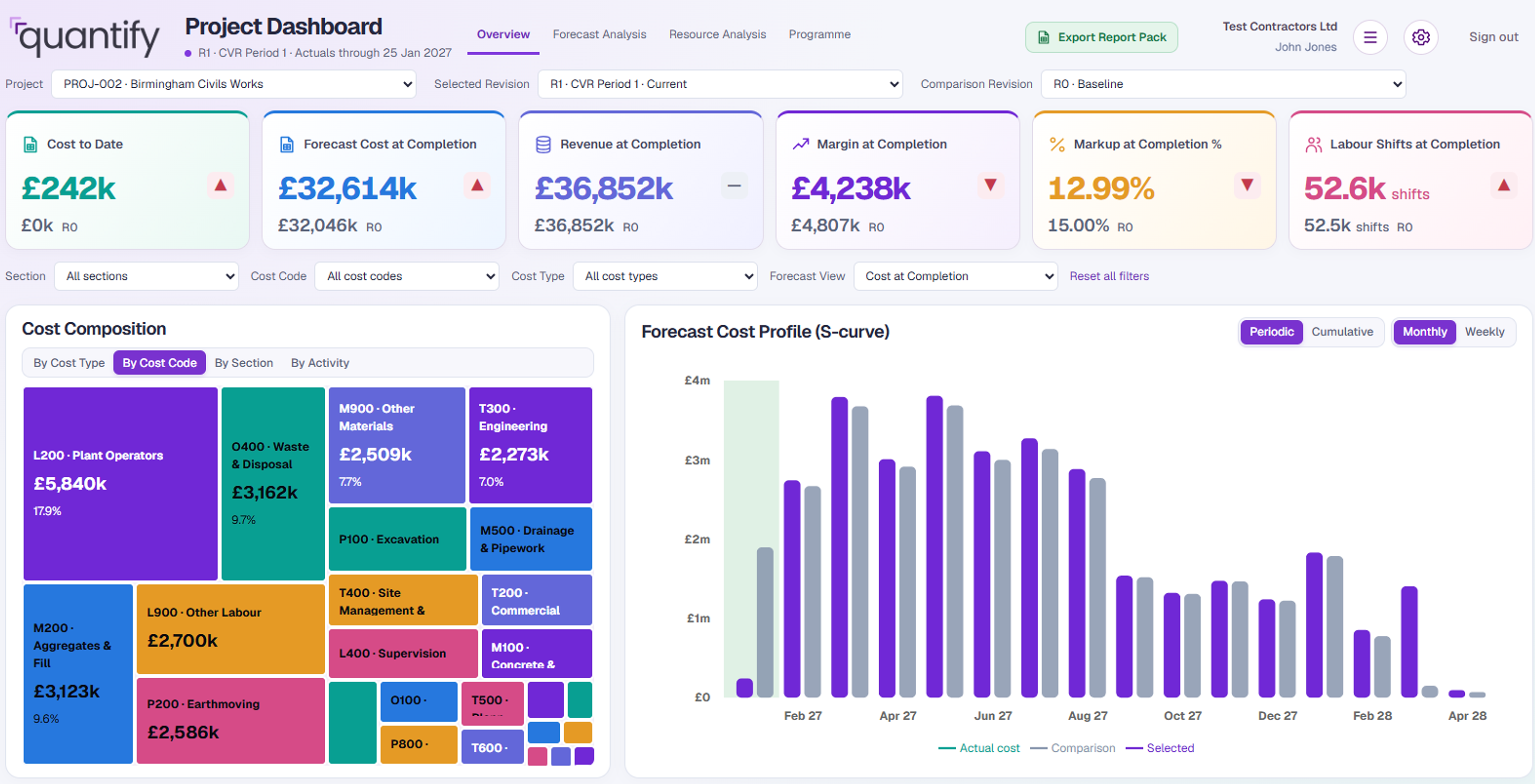
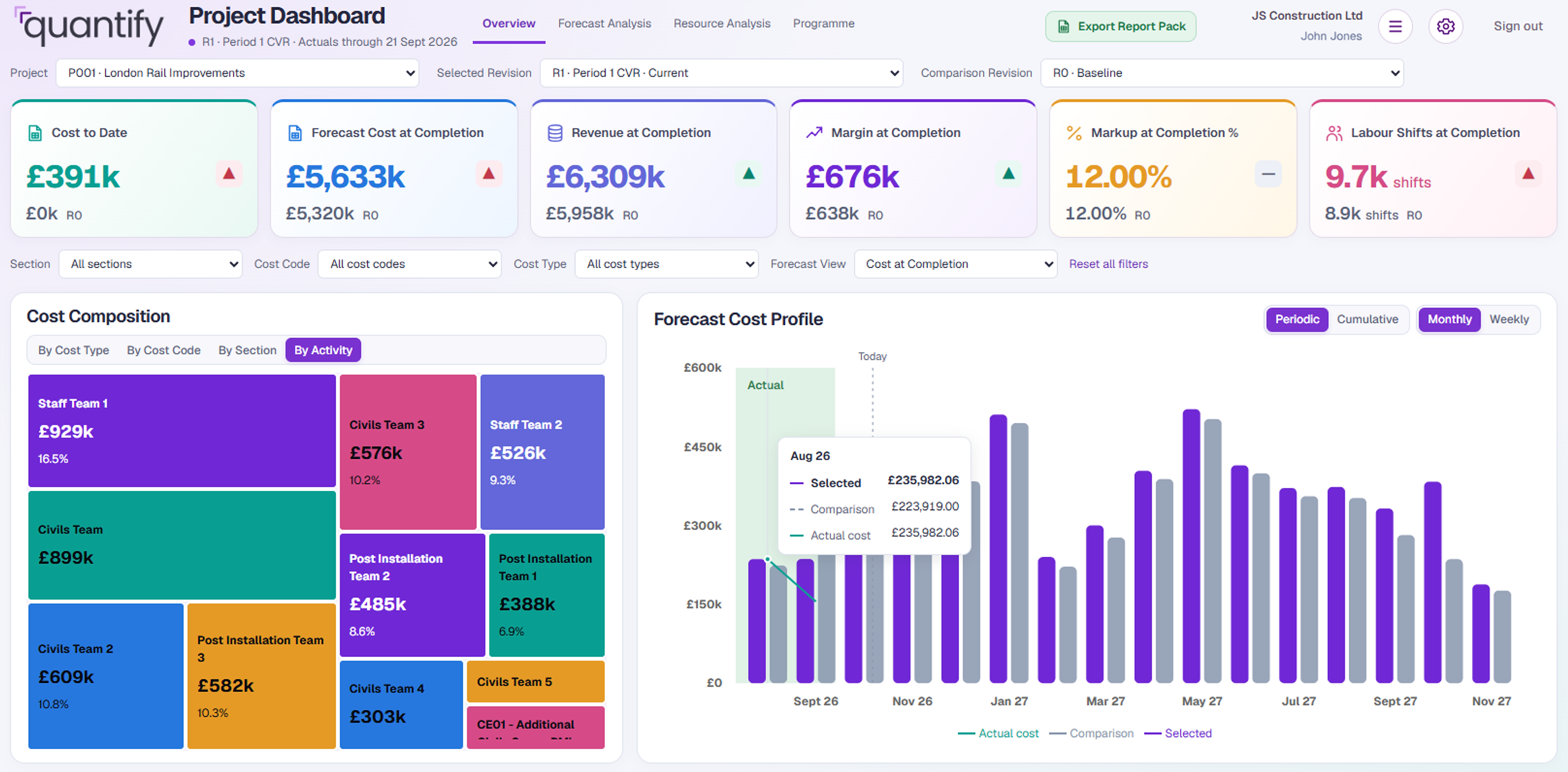
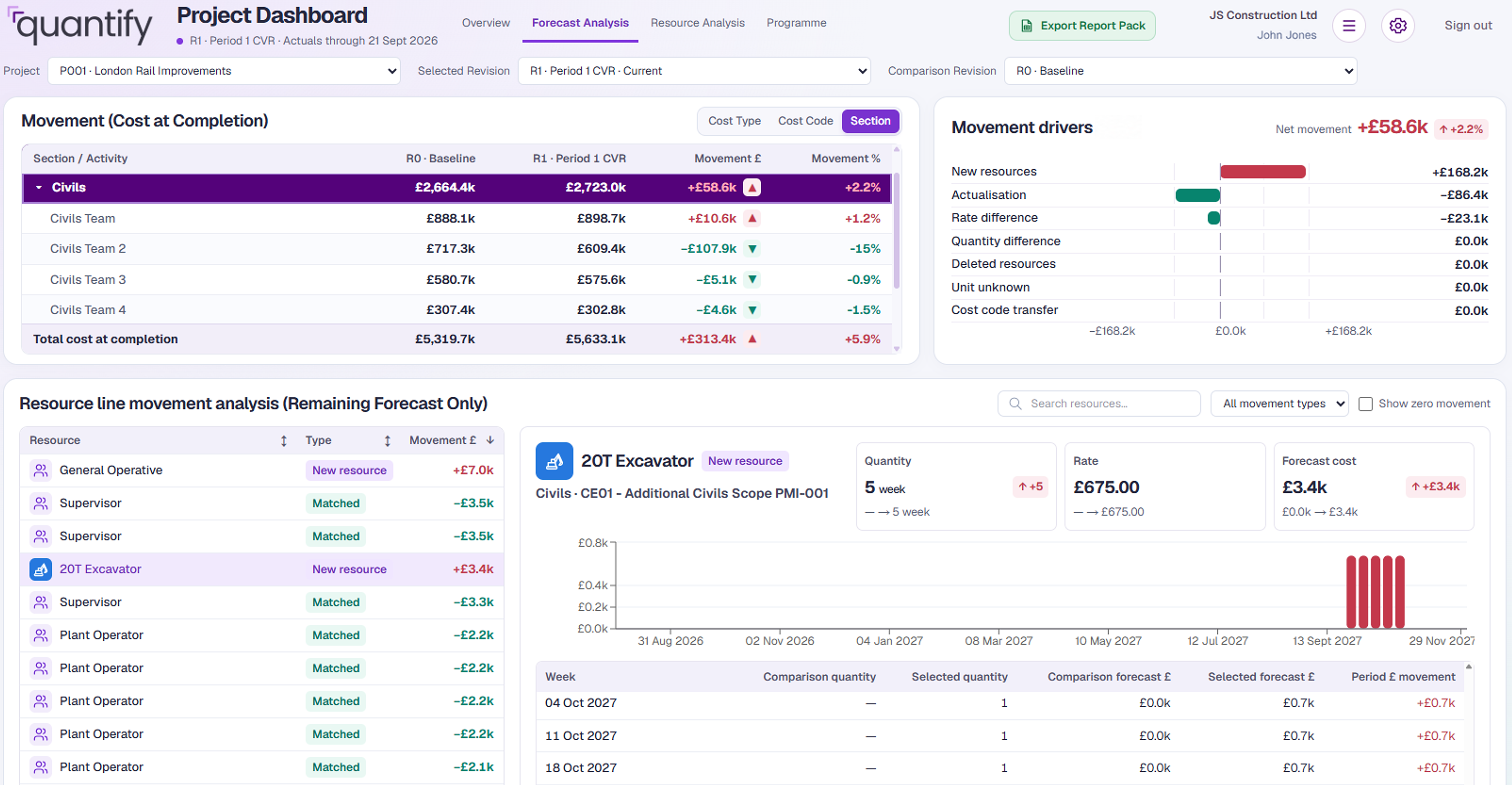
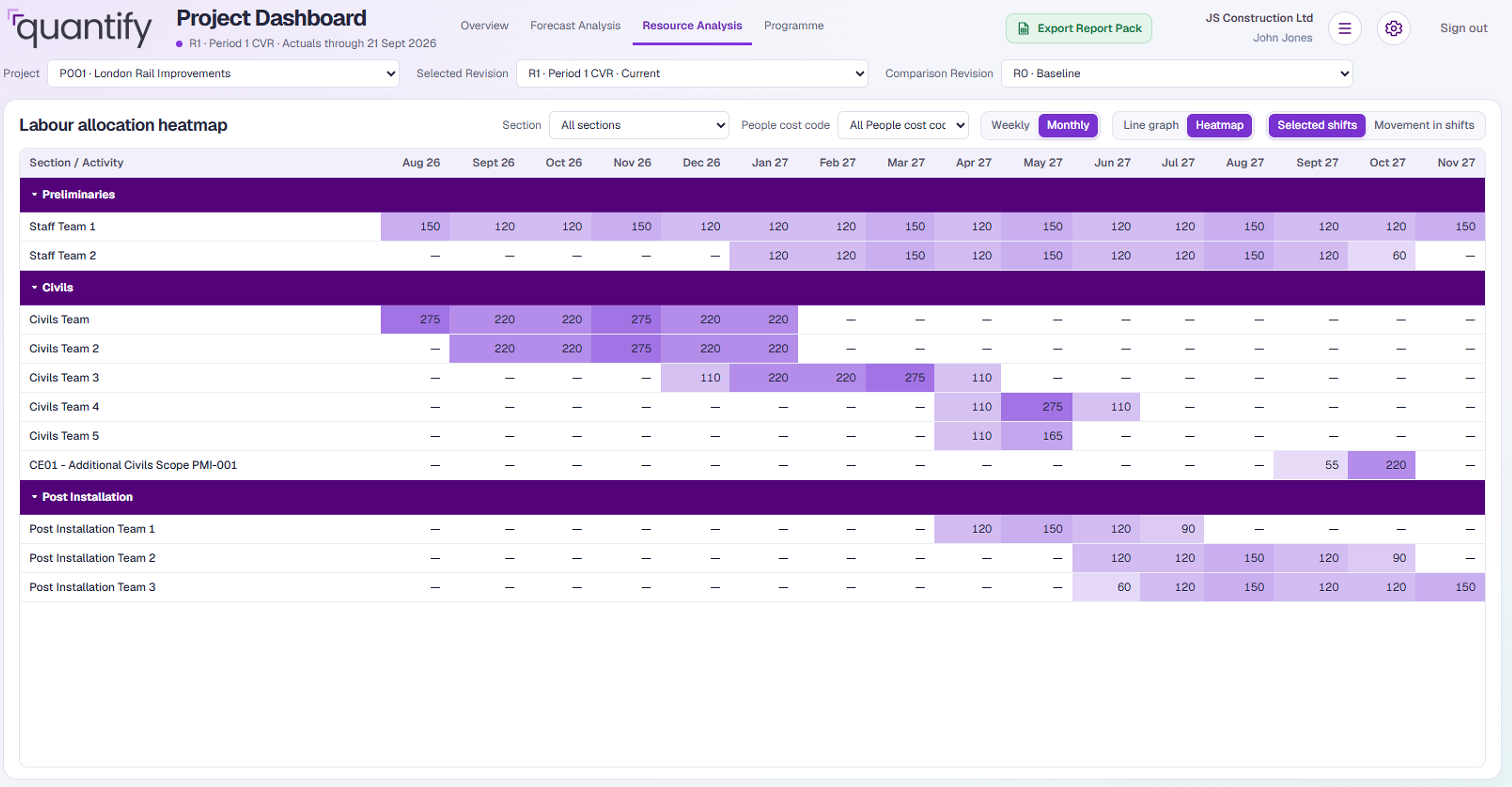
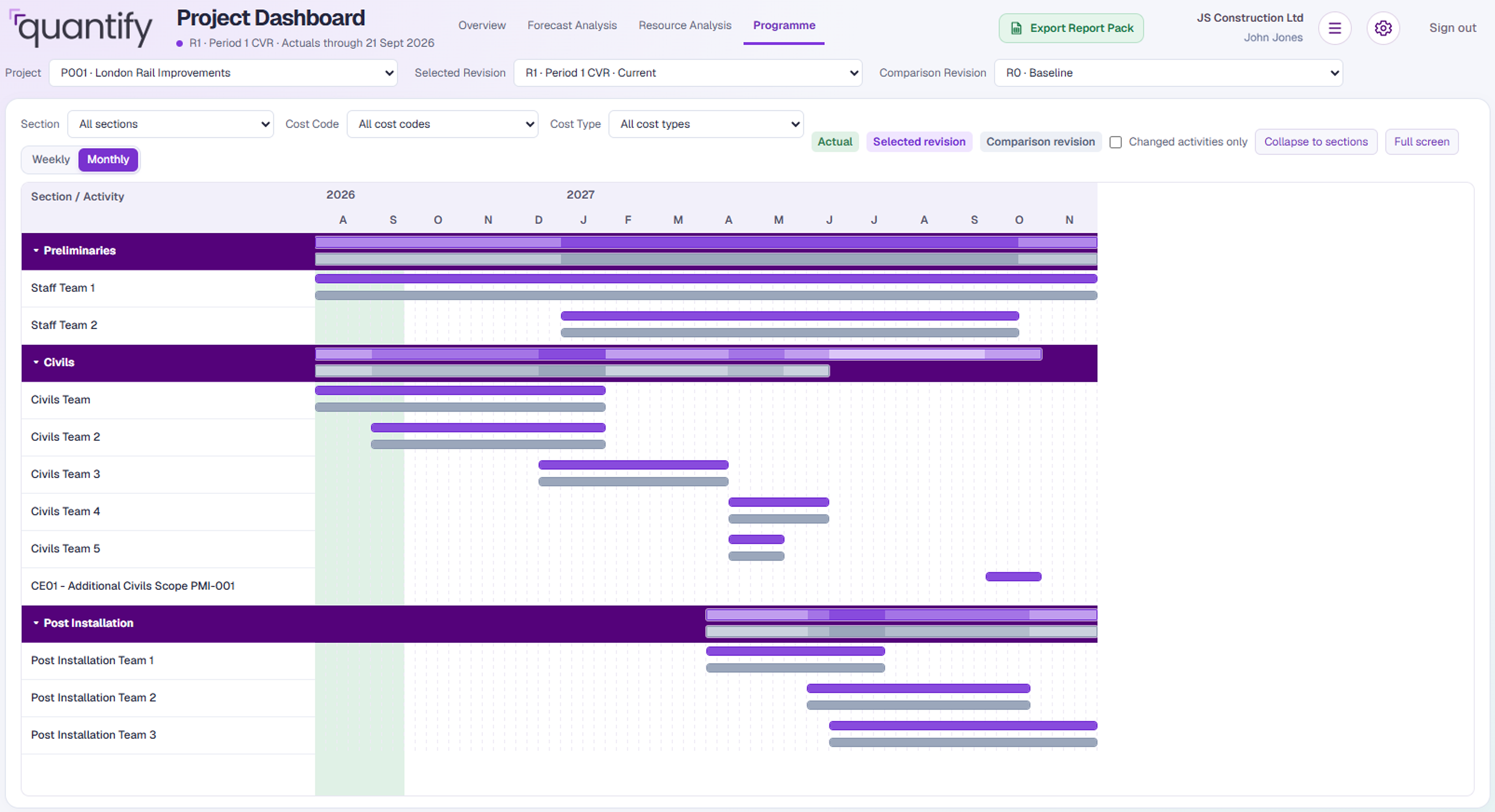
Quantify lets you compare any two forecast revisions instantly. Using the interactive dashboard, you can see the big picture, as well as drill down into the details to investigate the drivers of change.

Finding the balance

The flexibility of Excel.
The power of an app.

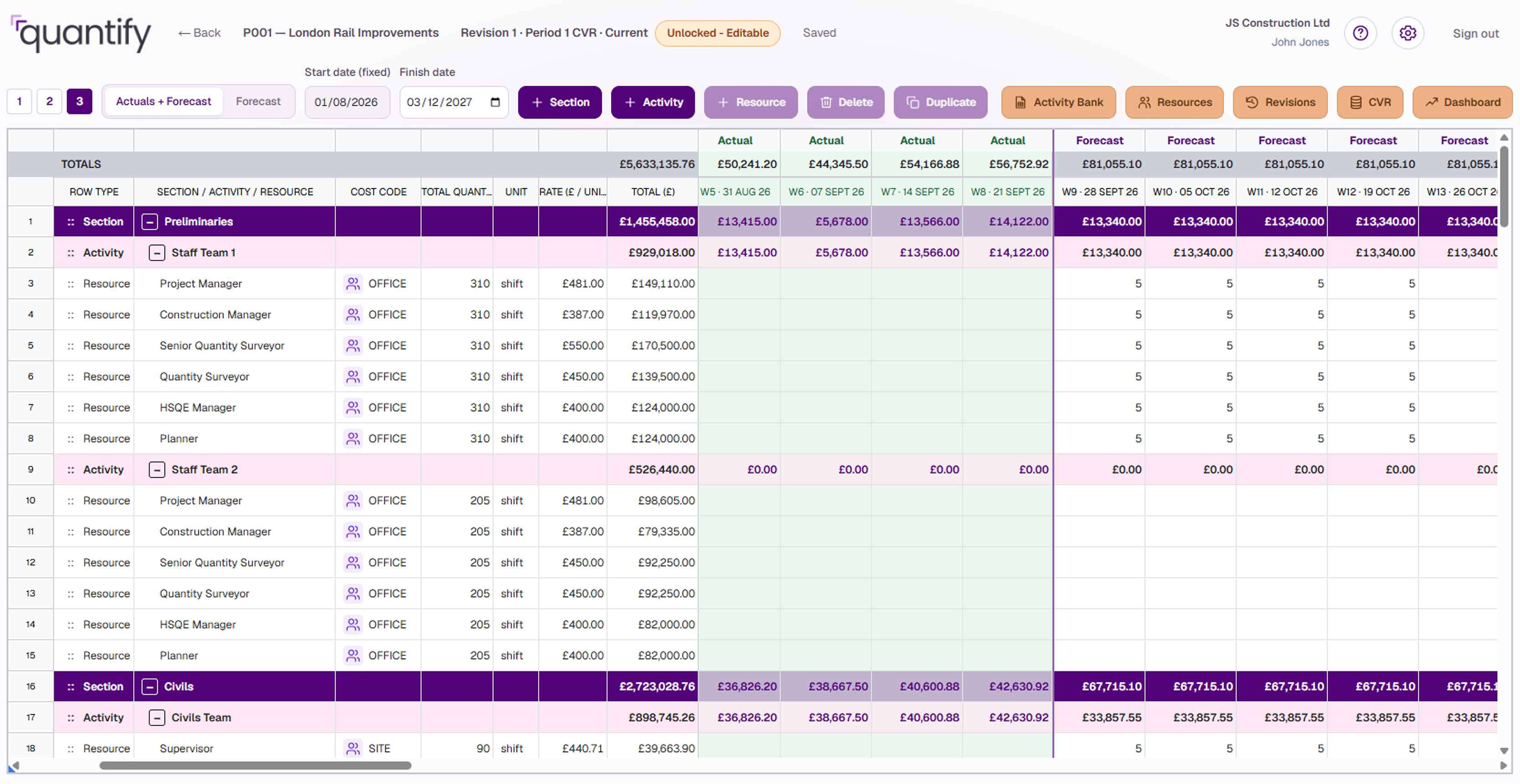
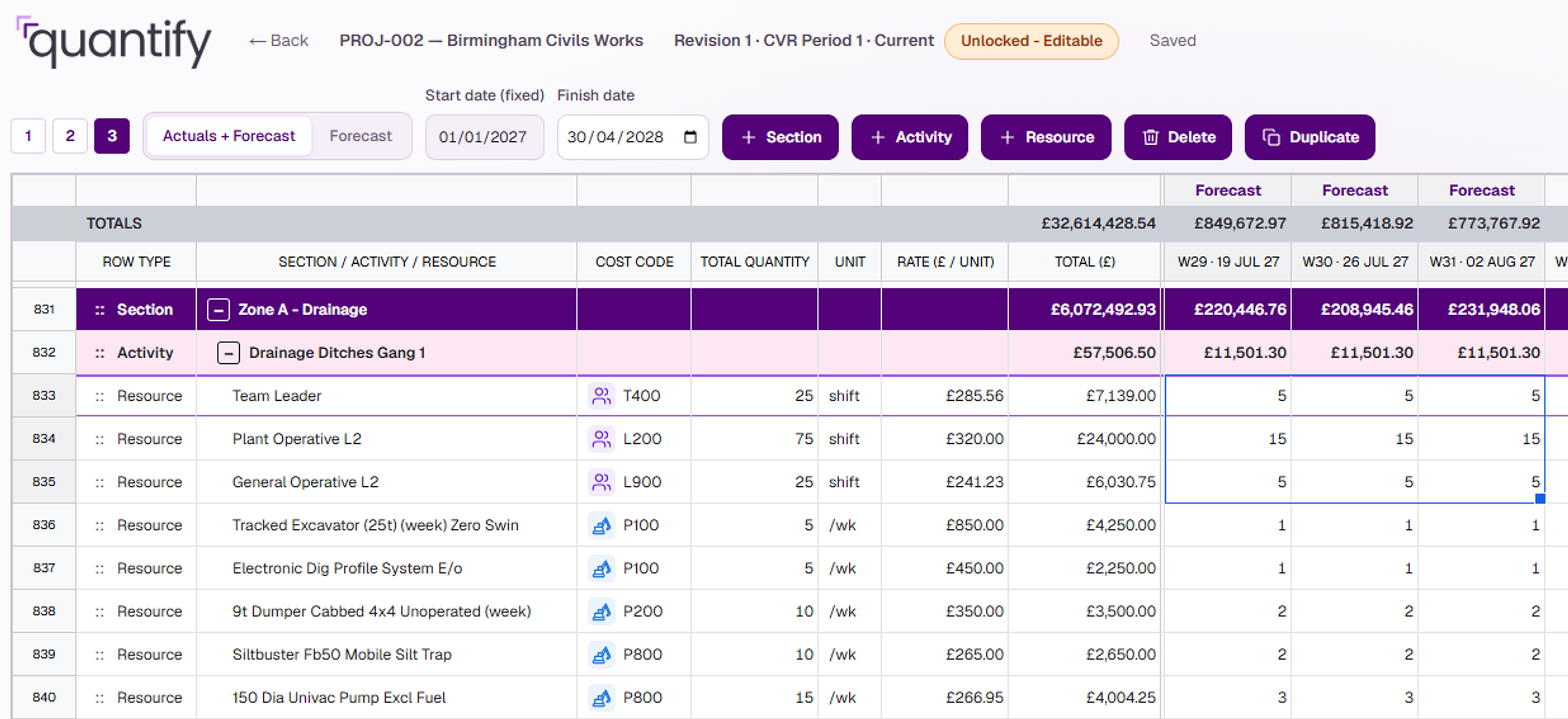
When building a resource plan, nothing beats a familiar spreadsheet-style grid. Resources down the left, dates across the top, with the ability to copy, paste and drag-fill quickly.

But a missing formula, an excluded row or a broken lookup can mean costs are missed from your forecast — or worse, from a price agreed with the client.

And that's before considering the time spent building, checking and maintaining the spreadsheets themselves.

Your commercial team should be managing project performance, not maintaining the system used to measure it.

Quantify gives you the calculations, structure and controls of an app, without sacrificing that spreadsheet experience

Spreadsheet-style cell selection across weekly resource quantities within Quantify's structured resource-based cost plan. View full size

AI-powered cost planning

QuantifyGPT

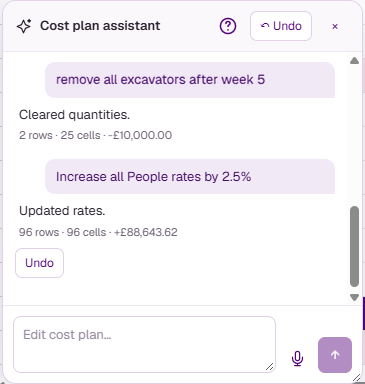
Make bulk changes to your cost plan using natural language.

Talk to your cost plan

  • “Increase all people rates by 2.5%.”
  • “Set all supervisor rates to 385 /day.”
  • “Remove all excavators after week 35.”
  • “Remove all vans after week 32.”
Quantify's AI cost plan assistant confirming bulk changes to resource quantities and people rates, with an option to undo the changes.

The bigger picture

Know what's happening across your projects.

When every project maintains its own spreadsheets, getting a clear picture of commercial performance across the business becomes a reporting exercise in itself.

  1. Where are problems creeping in?

  2. What is driving profit and loss?

  3. Where should we focus attention?

Quantify brings consistency to the bottom-up forecast, creating the foundation for meaningful analysis across the portfolio.

All your projects.
One dashboard.
One source of truth.

Quantify project dashboard showing cost, revenue and margin metrics, cost composition by cost code and the forecast cost profile. View full size
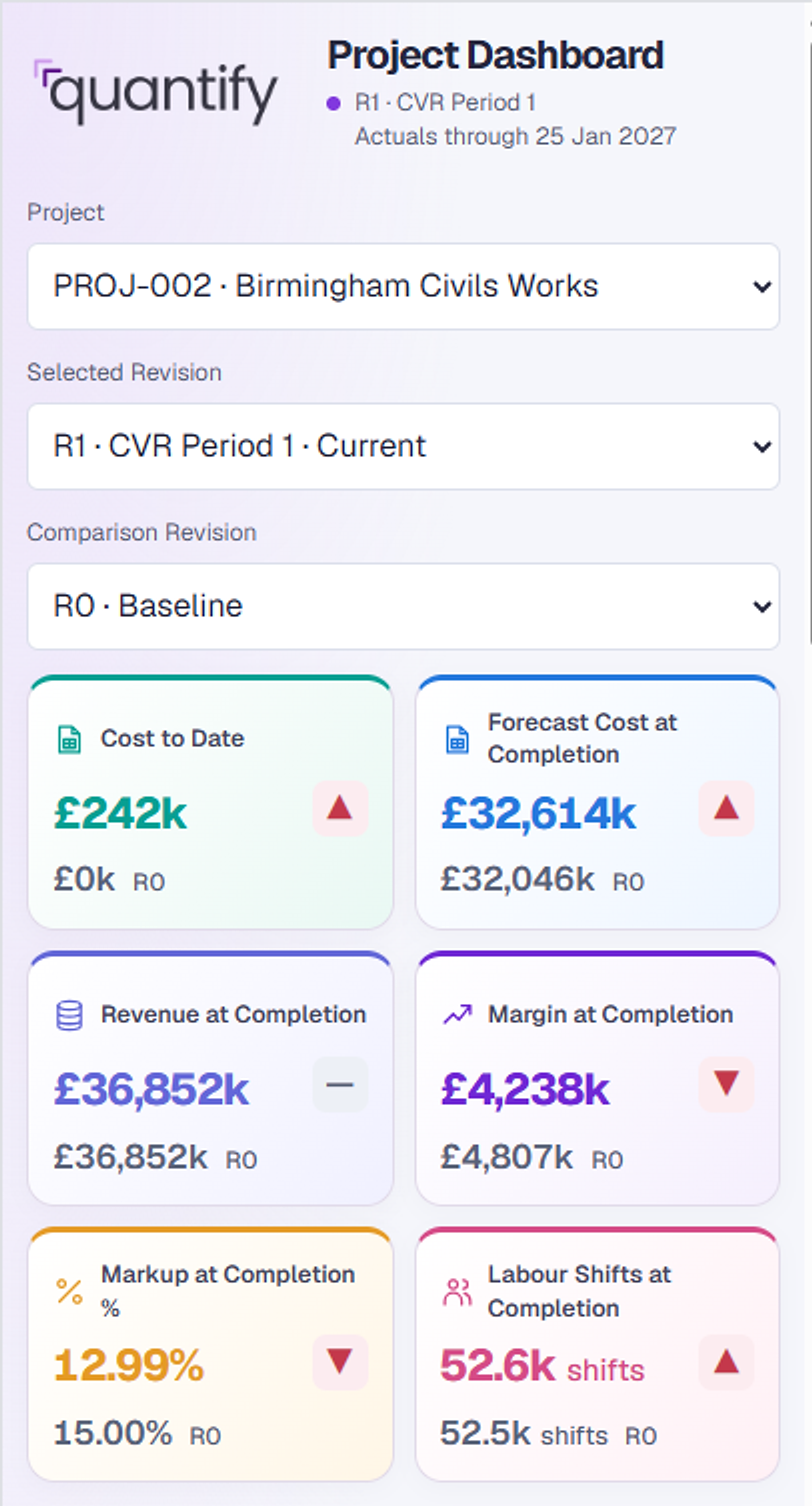
Mobile Quantify dashboard with project and revision selectors and cost, revenue, margin, markup and labour shift metrics. View full size

Features

Less work for your team.
More control for your business.

01 / Activity Bank

“I'm sure we've already done a price for a job like this somewhere...”

How often do we find ourselves searching through old estimates, copying information between spreadsheets and checking everything still adds up?

Quantify's Activity Bank lets you save and reuse complete activity build-ups, including labour, plant, materials, subcontract resources and their rates.

Add them directly to a new cost plan, then adjust the quantities, rates and resource plan to suit the project.
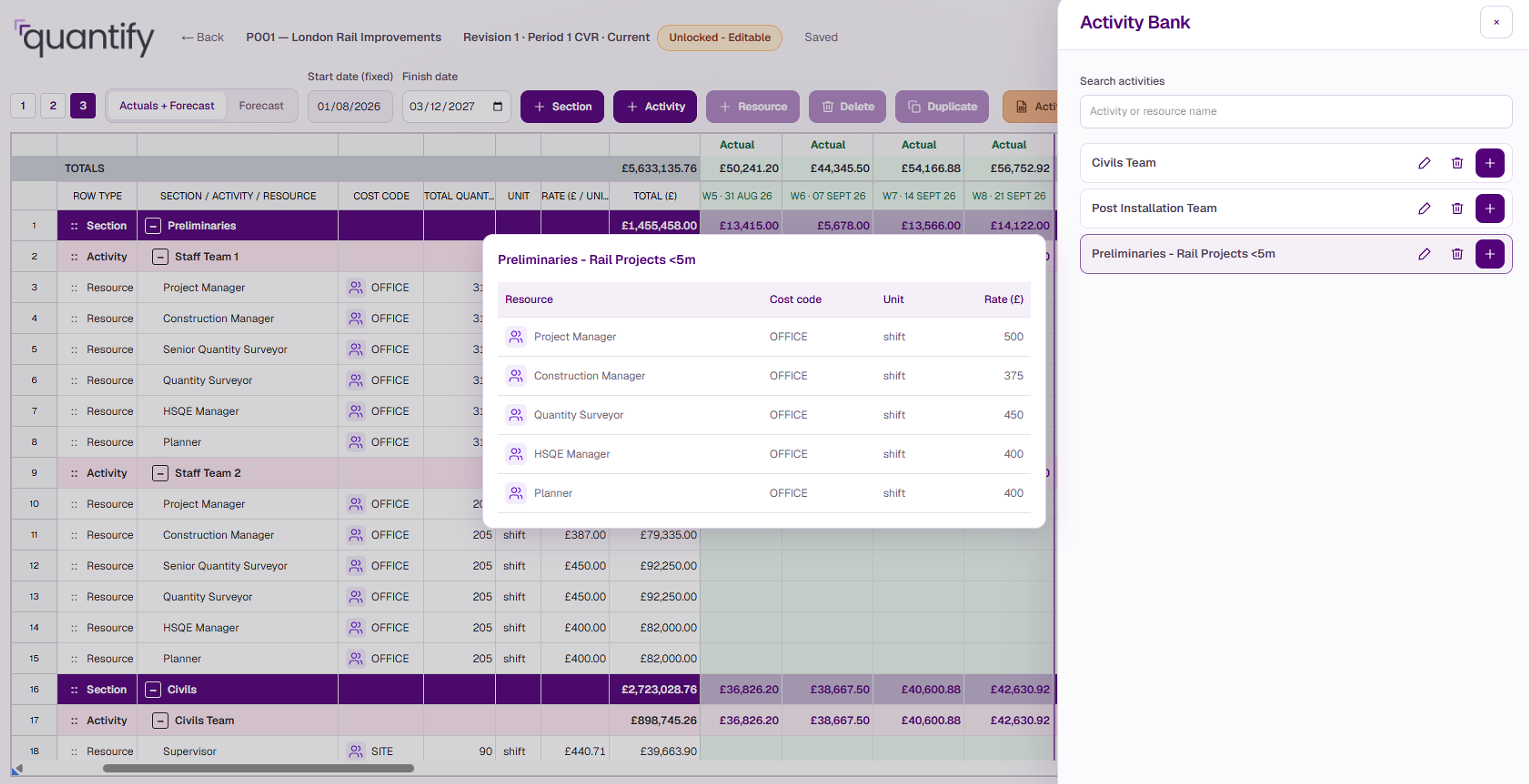
Reusable activities in the Activity Bank drawer with a preview of the selected activity's resource build-up, ready to add to the project cost plan. View full size

02 / Controlled cost codes

“The cost coding hasn’t been followed so it doesn’t really mean anything.”

Cost coding is only useful when the structure is appropriate for your business and applied consistently.

Too much detail can make it difficult to maintain, leading to inconsistent allocations and often abandoning it mid-way through a project. On the flipside, broad categories can mean you are unable to perform any meaningful analysis.

Quantify lets your organisation define a practical cost code structure and apply it consistently across projects.

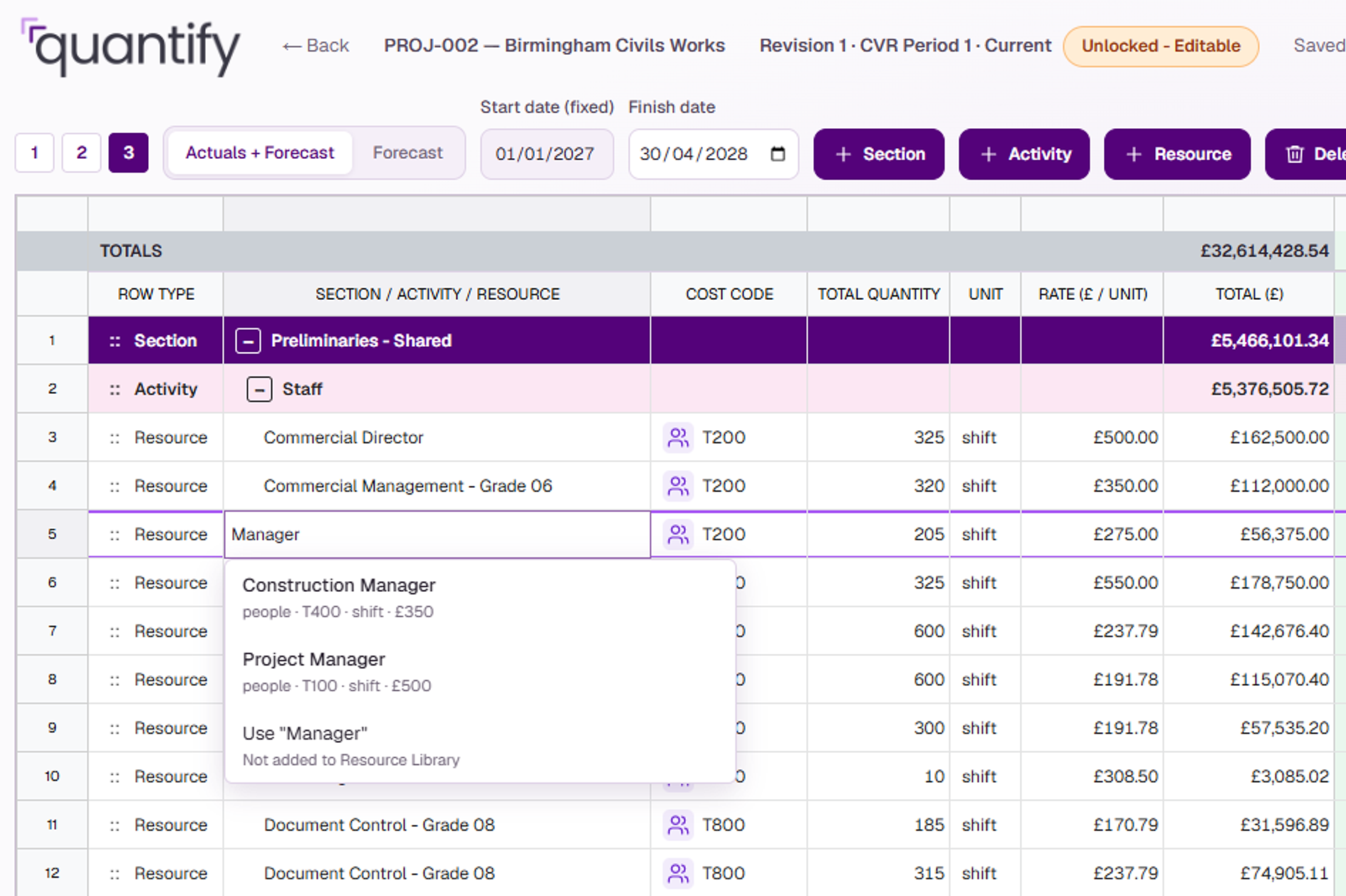
Search and select codes directly against resources, with built-in checks to identify missing codes.

03 / Forecast revisions

“Ah, I accidentally updated an old version on my desktop!”

When forecasts are scattered across shared drives, inboxes and individual spreadsheets, keeping track of revisions becomes a job in itself.

Quantify keeps your revisions together in one place. Create a new revision, preserve and lock the previous one, and maintain a clear history of your project's forecasts.

You can even compare any two revisions directly from the dashboard, without opening a single file.

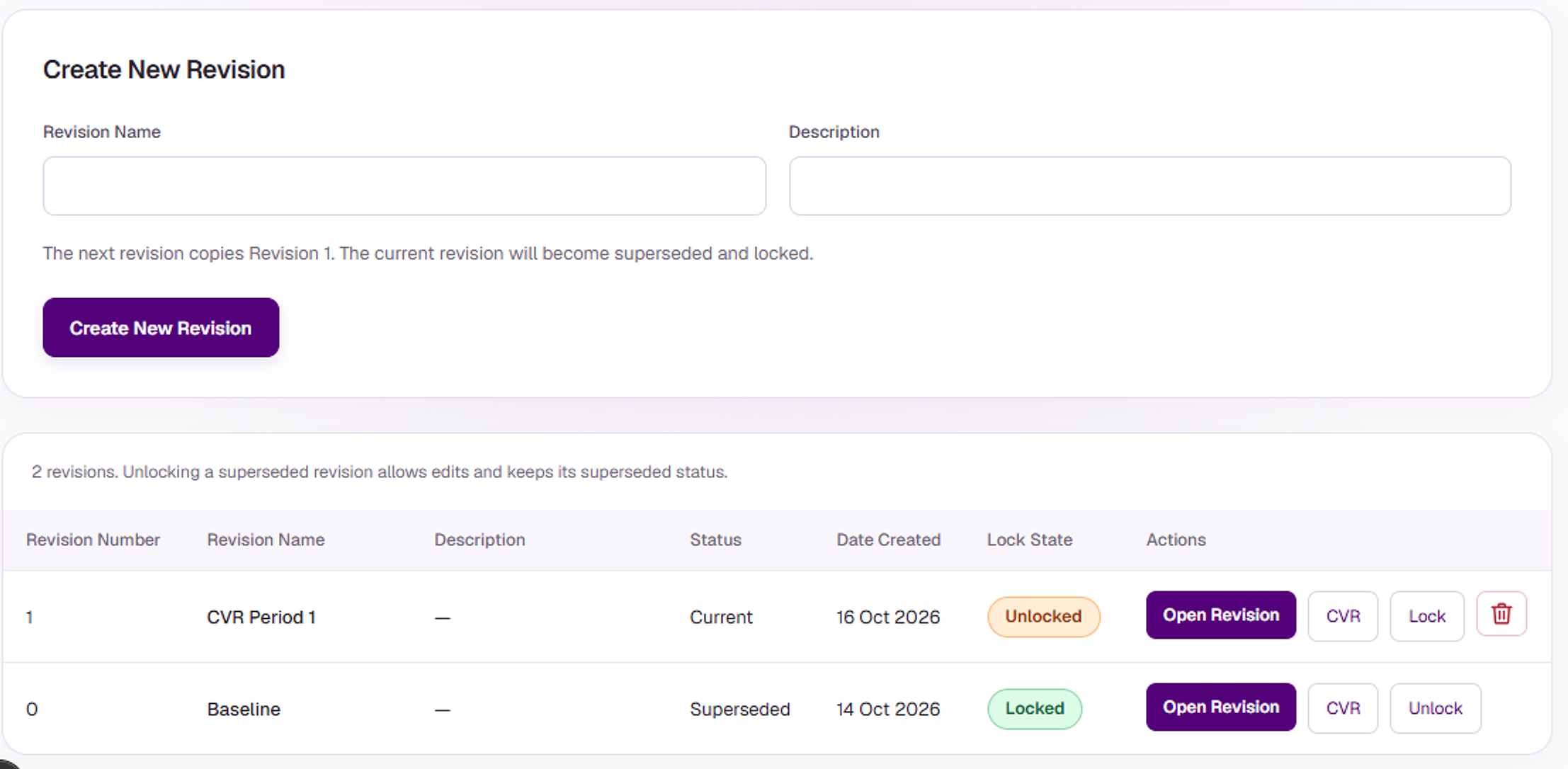
Revision Management showing the current CVR Period 1 forecast, a locked superseded baseline and controls to create a new revision. View full size

04 / Organisation Resource Library

“Has anyone got a rate for a 20T excavator?”

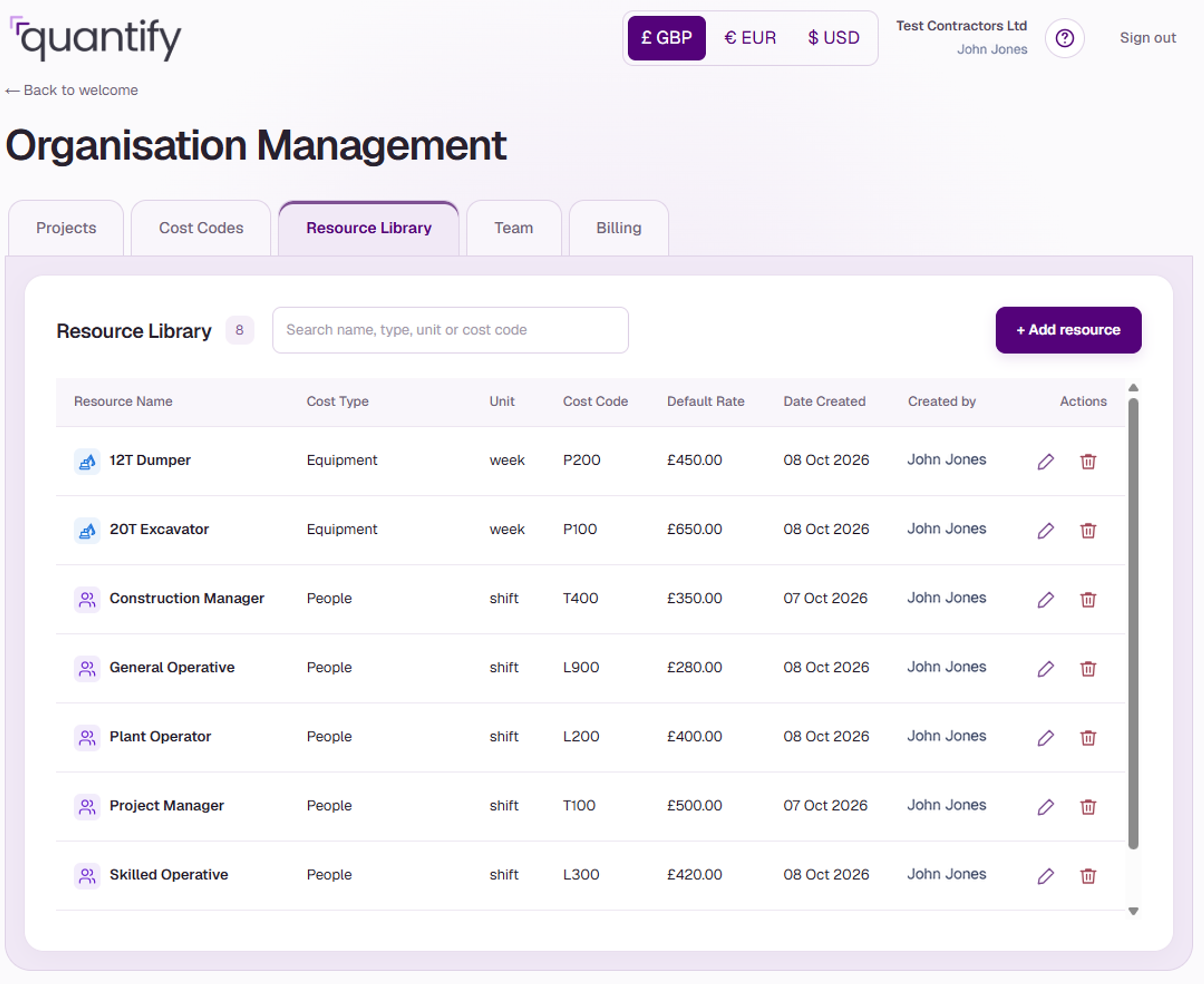
Quantify gives your organisation a shared Resource Library for labour, plant, materials and other resources, with commonly used rates available across every project.

Search and add resources directly from your cost plan, without having to find rates in old estimates or separate spreadsheets.

Projects can still use their own rates without changing the organisation's master library.

Made to fit into your business

1. Quantify as your detailed pricing and forecasting layer

“We are already using COINS/SAP/Oracle but I just struggle to actually do my cost plan in it”

You don't have to replace your whole system.

Use Quantify to build and maintain your detailed resource-based forecast, then export the information into your existing commercial reporting or cost-management systems.

Fill the gap that you are currently plugging with spreadsheets.

Quantify allows you to export numerous useful reports in Excel/CSV including a flat data export.

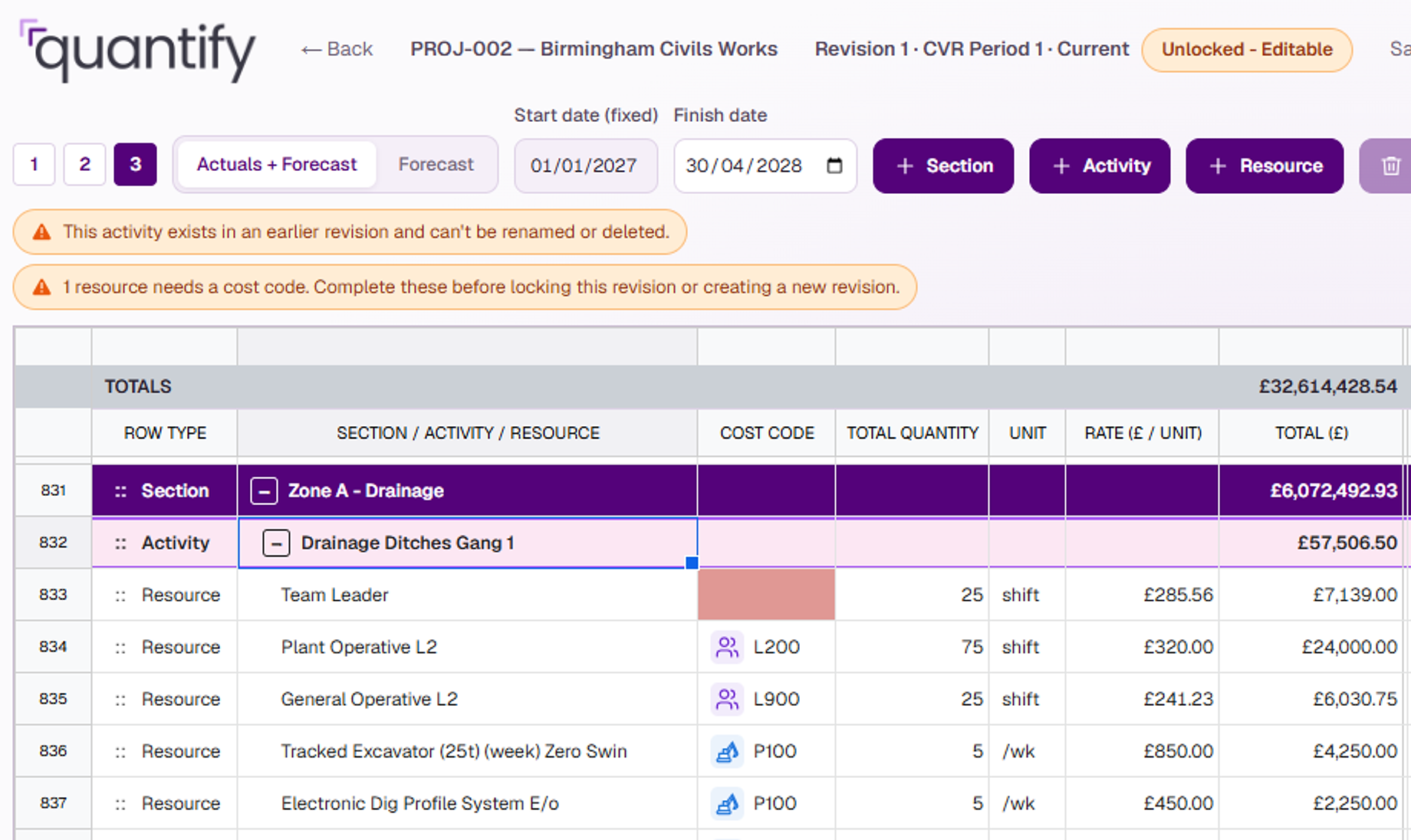
Drainage activity build-up showing labour and plant resources, quantities, rates, cost codes and weekly forecast totals. View full size

2. Quantify as your estimating and CVR environment

Use Quantify to build your tender price or baseline "bottom-up" forecast, then manage the monthly revisions and CVR.

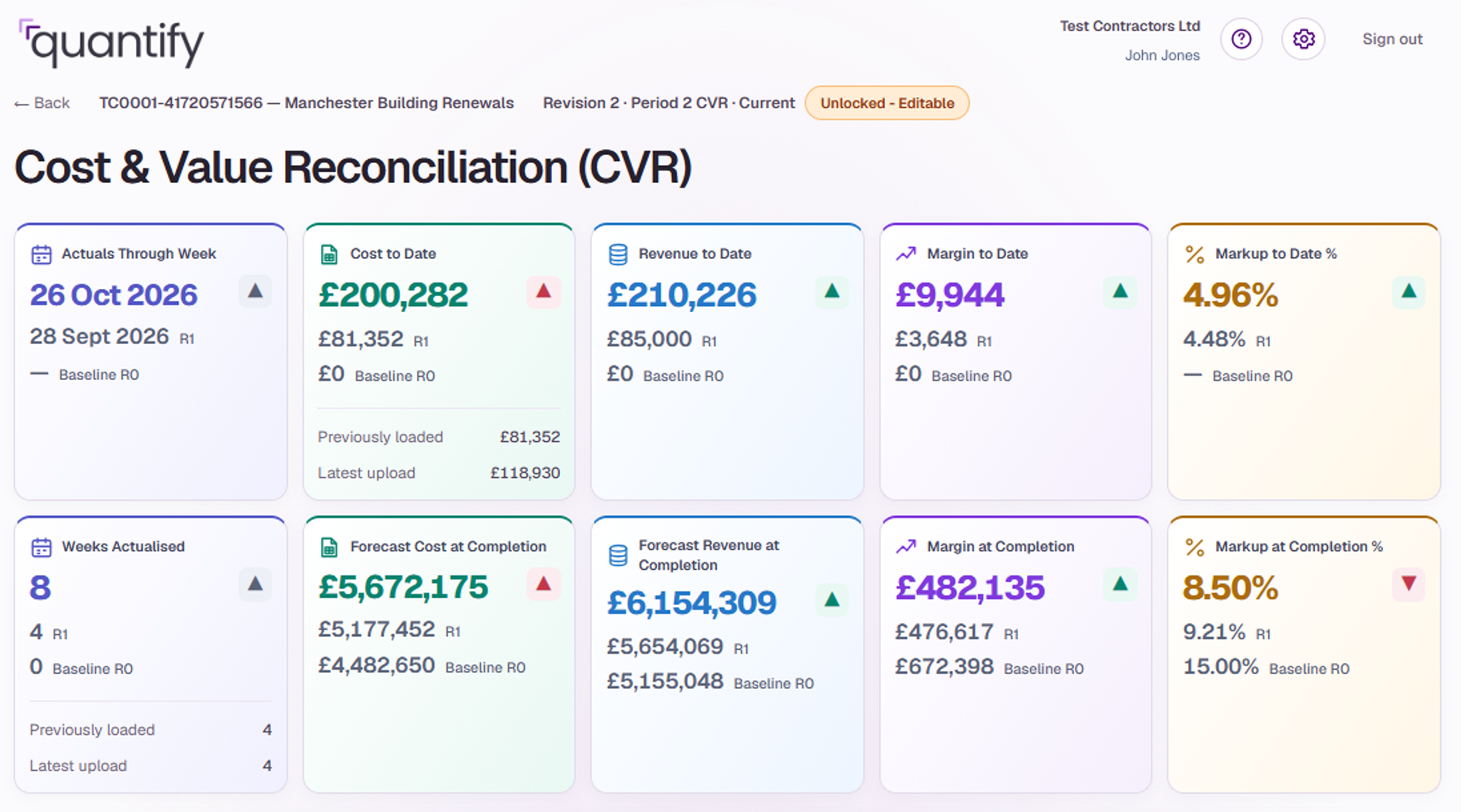
Revise the cost to complete, reconcile actual costs from your ledger with your forecast, and record your revenue to track your margin to date and at completion.

The revision history shows you how the position has changed.

Project CVR showing actual costs, revenue, margin, weeks actualised and the forecast at completion compared with earlier revisions. View full size

Update your cost plan with actuals. No Combining Spreadsheets

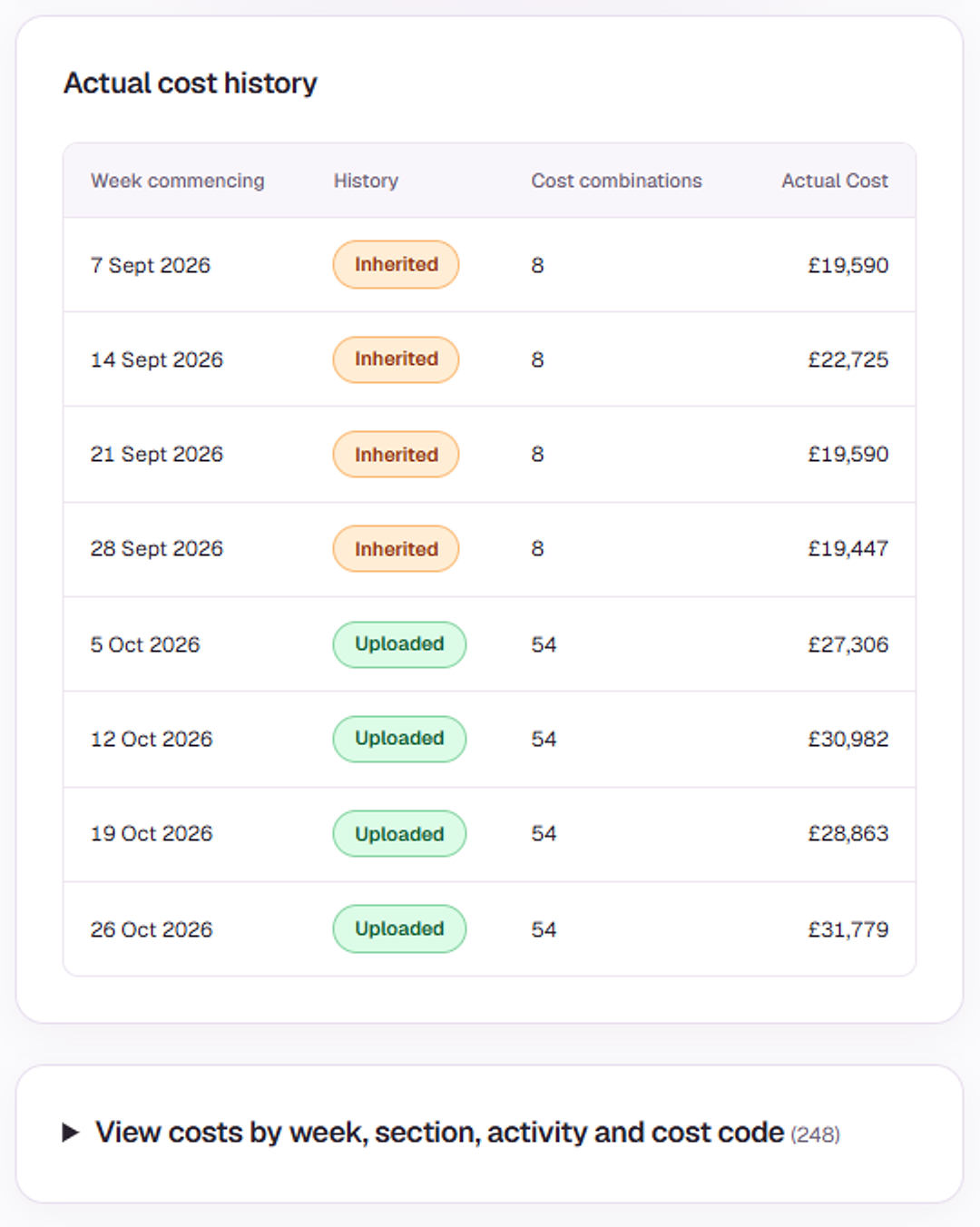
Import your actual costs and view them directly against your resource plan, without overwriting the original forecast. Everything stays connected to your sections, activities and cost codes.

Reporting-period actual cost history, showing inherited and uploaded weekly cost summaries. View full size

Pricing

Start with 30 days free.
No card details required.

Quantify

£39GBP
per user / month

Start with 30 days free.

  • Unlimited projects
  • All functionality

Create your first project within minutes.

FAQs

A few things
you might want to know.

How does the 30-day free trial work?

You can try Quantify for 30 days before committing to a paid subscription.

You do not have to put in your card details.

Sign up and create your first project in minutes, without a lengthy onboarding process.

The trial gives you full access to all product features. Once you have created your organisation account, you can invite as many users as you want.

After the trial, you can decide whether you want to pay to keep your account, and how many users you would like.

How much training will I need?

Quantify is designed to be intuitive to use with little training required for professionals already familiar with resource planning and cost forecasting.

If you understand how to build a project price or forecast, the workflow should feel familiar.

Each page has a ? icon that provides practical guidance when selected.

How is my project information protected?

Optimise Projects is a professional Quantity Surveying practice and a Royal Institution of Chartered Surveyors (RICS) Regulated Firm. We comply with professional standards relating to confidentiality and the handling of client data.

Quantify uses authenticated accounts and organisation-level access controls to protect your project information.

Your organisation’s data is separated by design from other customers’ data, and access is managed through user permissions.

How will backups and recovery be managed?

The Quantify database uses automatic nightly backups and a separate independent cloud backup, providing additional protection against accidental data loss or system failure.

Backups and recovery procedures will be managed centrally, without users needing to maintain their own backup copies.

Do I need to install any software?

No. Quantify runs in your web browser.

There is no desktop software to install or maintain.

Can my team work on shared projects?

Yes. Quantify is built around organisations rather than individual spreadsheet files.

Authorised team members can access shared project information without exchanging separate workbook copies.

Do we need to use such granular cost codes to make it work?

The level of cost detail appropriate for your business depends on the size and nature of your projects, how actual costs are recorded and the level of administration that’s practical.

Quantify can be set up to suit the requirements of your organisation via the Cost Codes, as well as individual project requirements by using Sections and Activities.

If detailed cost coding isn’t practical or required for your business, e.g. “Supervisors Grade 1”, “Plant Operators Grade 2”.

You can use broader codes for example “Site Based Operatives”.

You will then be able to compare forecast and actual costs at the level you’ve chosen, as well as through project Sections and Activities.

What happens if a team member leaves?

Your project information remains within your organisation.

Authorised team members can continue to access the forecast, its underlying resources and revision history.

Your organisation’s admins can remove the departing user’s access and reassign their licence to another team member, subject to the subscription arrangements.

Is Quantify suitable for businesses of different sizes?

Yes.

Quantify is designed for self-delivery contractors across a range of business sizes.

Whether you’re managing a few projects or a much larger portfolio, the principles of consistent pricing, resource planning and forecast control remain the same.

Can I cancel my subscription?

Quantify is intended to operate as a monthly subscription without a long-term contractual commitment.

You may cancel at any time.

You can quickly increase or reduce the number of users you are paying for from within the app.

If you wish to remove your data and organisation account entirely, simply cancel your subscription and delete your organisation from within the app.

Quantify by Optimise Projects

Save time,
increase confidence,
understand your projects.

Start 30-day free trial

Create your first project within minutes.